BT Sync (Resilio) as geo replication
update: In early 2016, Resilio was spun out of BitTorrent to bring distributed technology to the enterprise. This is awesome news and I’ll be posting some updates about what Resilio is up to moving forward. Below is my initial post from 2013 that was syndicated on the Bittorrent Sync blog.
What is BitTorrent Sync?
The concept is simple: using a local client on your desktop or laptop, Sync will synchronize the contents of a selected folder to other remote Sync clients sharing the same key. Synchronization is done securely via an encrypted (AES) bittorrent session. This ends up being effective for moving a lot of data across multiple devices and while I think it was initially designed for secure private Dropbox-style replication, I’ve been testing it as an alternative method of geo-replication between GlusterFS clusters on Fedora.
Right off the bat there were a few things that got my gears turning:
- a known and proven P2P protocol (monthly BitTorrent users are estimated at something insane like a quarter of a billion)
- encrypted transfers
- multi-platform
- KISS-oriented configuration
What is GlusterFS?
GlusterFS is an open source project leveraging commodity hardware and the network to create scale-out, fault tolerant, distributed and replicated NAS solutions that are flexible and highly available. It supports native clients, NFS, CIFS, HTTP, FTP, WebDAV and other protocols.
GlusterFS has native Geo Replication. Why not use it?
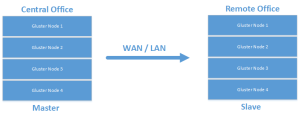
Leveraging native GlusterFS geo-replication for a single volume is a one-way street. A replicated volume is configured in a traditional master/slave configuration.
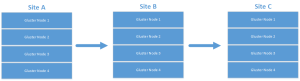
It can also be configured for cascading setups that allow for more interesting archival configurations.
Or even:
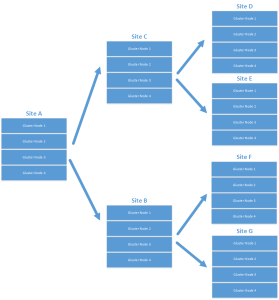
While I’m sure this works for replication and certain DR scenarios, I’m looking at multi-master configurations with multiple datacenters all “hot”, possibly removing the need for a centralized repository. I’d also like a scenario where all sites serve as DR locations for any other participant while leveraging the closest cluster as a data endpoint for writes. Something like this:
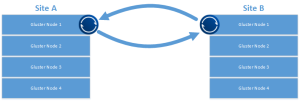
This type of configuration also allows for a more easily grown environment and a quick way to bring another site online.
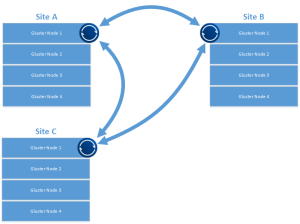
One of the more interesting BT Sync features is the optional use of a tracker service. This helps with peer discovery, letting the tracker announce SHA2(secret):IP:port to help peers connect directly. The tracker also acts as a STUN server, helping with NAT traversal for peers that can’t directly see each other behind firewalls. Worth noting: even with the tracker service in use, all data transmission is encrypted in flight.
Getting Started
For quick testing, find a couple of boxes to get replication moving between. These could be minimal install Linux boxes, Samba servers, web servers (backup replication?), or in my case, a single node of a Gluster cluster. If you’re interested in getting started with Gluster, here’s a good place to start.
A quick note if you’re using Gluster: On one of the nodes, make sure the GlusterFS client is installed. Create a directory and mount the volume you want replicated using the GlusterFS client. There are more complicated ways to do this, but for testing, this will work fine.
Download the Client
Identify the directory you want to replicate and download the client from BitTorrent Labs. For me it was the x64 Linux client.
Configuration
First, untar the download and get some config files ready. We’ll also build an init.d script to ensure the client runs on startup.
tar -xf btsync.tar.gz
sudo mv btsync /usr/bin
sudo mkdir /etc/btsync
sudo mkdir /replication
Generate the initial config file:
sudo btsync --dump-sample-config > /etc/btsync/btsync.conf
Edit the following values in the config. Change the device name:
"device name": "My Sync Device",
to:
"device name": "whateveryourhostnameis",
Change the storage path:
"storage path" : "/home/user/.sync",
to:
"storage path" : "/etc/btsync",
Uncomment and set the pid file:
"pid_file" : "/var/run/btsync.pid",
Since we’re identifying replicated folders via the config file, the web UI normally available in the Linux client will be disabled. Generate a secret for your share:
sudo btsync --generate-secret
I find it easier to dump the secret directly to the bottom of the config file:
sudo btsync --generate-secret >> /etc/btsync.conf
In the shared folders section, replace MY_SECRET_1 with the secret you generated:
"secret" : "GYX6MWA67INIBN5XRHBQZRTGYX6MWA67XRHPJOO6ZINIBN5OQA", // * required field
Update the directory:
"dir" : "/replication", // * required field
In the shared folders section, comment out the example known hosts:
// "192.168.1.2:44444",
// "myhost.com:6881"
Important: You’ll need to remove the leading /* and trailing */ from the shared folders section.
Start bittorrent sync with the config:
btsync --config /etc/btsync.conf
Sync Init Script
Not claiming this is a work of art, but it gets the job done. Create /etc/init.d/btsync with the following:
#!/bin/sh
#
# chkconfig: - 27 73
# description: Starts and stops the btsync Bittorrent sync client
#
# pidfile: /var/run/btsync.pid
# config: /etc/btsync.conf

# Source function library.
. /etc/rc.d/init.d/functions

# Avoid using root's TMPDIR
unset TMPDIR

# Source networking configuration.
. /etc/sysconfig/network

# Check that networking is up.
[ ${NETWORKING} = "no" ] && exit 1

# Check that btsync.conf exists.
[ -f /etc/btsync.conf ] || exit 6

RETVAL=0
BTSYNCOPTIONS="--config /etc/btsync.conf"

start() {
    KIND="Bittorrentsync"
    echo -n $"Starting $KIND services: "
    daemon btsync "$BTSYNCOPTIONS"
    RETVAL=$?
    echo
    [ $RETVAL -eq 0 ] && touch /var/lock/subsys/btsync || RETVAL=1
    return $RETVAL
}

stop() {
    echo
    KIND="Bittorrentsync"
    echo -n $"Shutting down $KIND services: "
    killproc btsync
    RETVAL=$?
    [ $RETVAL -eq 0 ] && rm -f /var/lock/subsys/btsync
    echo ""
    return $RETVAL
}

restart() {
    stop
    start
}

rhstatus() {
    status btsync
    return $?
}

# Allow status as non-root.
if [ "$1" = status ]; then
    rhstatus
    exit $?
fi

case "$1" in
    start)        start ;;
    stop)         stop ;;
    restart)      restart ;;
    reload)       reload ;;
    status)       rhstatus ;;
    condrestart)  [ -f /var/lock/subsys/btsync ] && restart || : ;;
    *)
        echo $"Usage: $0 {start|stop|restart|reload|status|condrestart}"
        exit 2
esac

exit $?
Testing the Sync Service
Set the init script to executable and enable it at startup:
chmod 755 /etc/init.d/btsync
chkconfig --add btsync
chkconfig btsync on
Other Nodes and Additional Thoughts
With the above in place, configure additional btsync clients on Gluster nodes (or whatever test system you’re using) at your remote locations using the same secret. The mount point / local folder can be different, but the secret must be the same. This will allow replication to start among the identified folders. Thanks for reading and check out other cool use cases for BitTorrent Sync on the BitTorrent Sync forums.